Case Study — Atlassian / Bitbucket

Building Bitbucket's
AI research foundation

As the first dedicated researcher for Bitbucket, I ran three parallel research programs — evaluating live AI features, mapping developer Jobs to Be Done across the full SDLC, and defining the competitive strategy that would make Pipelines worth switching to.

RoleLead UX Researcher (first for Bitbucket)
CompanyAtlassian / Bitbucket
TimelineAugust 2025 – December 2025
MethodsEvaluative Interviews · JTBD · Kano-style Questionnaire
1stDedicated researcher ever assigned to Bitbucket
3AI solutions evaluated with software developers
3%Target RovoChat WAU growth — research helped get it on track
3Architectural models tested against GitHub & GitLab

Bitbucket's AI moment — and no research to guide it

Bitbucket had never had a dedicated researcher. When AI became a strategic priority for Atlassian in 2025, the Bitbucket team was moving fast — shipping RovoChat into Open Beta, developing "Suggest fix" for Pipelines, and exploring inline code search — but doing it without a clear picture of what developers actually needed from AI, or how Bitbucket compared to GitHub and GitLab in their minds.

I was brought in as the first researcher for Bitbucket to answer three interconnected questions: Are the AI features we've already shipped working? What AI jobs should we solve next? And what would make Pipelines worth switching to?

These weren't sequential questions — they had to run in parallel, across two separate research programs, with a lean team and a product that was already in motion.

August 2025
I join Bitbucket as the first dedicated researcher — Atlassian has no existing research foundation for the product
September 2025
RovoChat ships to Open Beta — the first AI feature live for Bitbucket users
September 2025
AI in Bitbucket research completed — 6 × 60-minute developer interviews across SMBs and enterprises
October 2025
I represent the Atlassian research team at TEAM 2025 in Barcelona — using the conference as a live environment to test and expand the AI JTBD framework
November 2025
Pipelines competitive strategy research completed — Kano-style study with DevOps engineers on competitor CI/CD solutions
Ongoing
AI JTBD framework handed to DevAI team for consolidation with broader Atlassian AI research

Three programs, one foundation

I structured the work into three distinct but interconnected programs — each answering a different question, all feeding into Bitbucket's AI strategy.

01
Evaluate live AI features
Test RovoChat, "Suggest fix", and inline code search with real developers to understand what's working, what's confusing, and what's missing.
02
Build the AI JTBD framework
Map Jobs to Be Done across the full SDLC — identifying which developer jobs are already served by AI, and which represent opportunities unique to Bitbucket.
03
Define competitive strategy
Understand why developers choose GitHub and GitLab over Pipelines, and which architectural models would make switching realistic.
Case Study 1 of 3

Evaluating three live AI solutions

I conducted 6 × 60-minute interviews with software developers across SMB and enterprise companies — all active Bitbucket users, some also using Pipelines. Participants came from highly varied contexts: an AI startup in the UK, a medical device security team, a financial services firm with strict AI governance, and a government contractor with no AI access at all.

We tested three solutions in each session, tracking usefulness ratings and capturing both expected and unexpected use cases.

1
RovoChat in Bitbucket
Three Golden Prompts shown when RovoChat is first activated
Mixed results

Prompts 1 and 2 — "Explain the code changes to me" and "Summarise the comments on this pull request" — were received positively by most participants. They saw clear, immediate value for understanding unfamiliar code and catching up on review threads.

Prompt 3 — "Summarise this pull request" — caused widespread confusion. Participants couldn't distinguish it from Prompt 1, and found the overlap frustrating. A consistent theme emerged: developers wanted AI to go deeper into the codebase, not just describe what's already visible.

"It's confusing because I already have a prompt to explain the code changes. Then I have another one to summarise the comments. Then I'm seeing another one that says summarise this pull request. It feels repetitive to me."

— P1, Backend Engineer at an AI startup

When asked what else they'd want to type into RovoChat, participants consistently expected code-specific queries — security checks, optimization suggestions, reviewing test coverage against Jira, and identifying suitable reviewers based on recent contributions. These weren't edge cases; they were the primary use case participants arrived with.

Recommendations
  • Replace or rewrite Prompt 3 — it provides no clear additional value over Prompt 1
  • Explore proactive AI delivery — surfacing code explanations automatically when a PR is opened, rather than waiting for the user to prompt
  • Expand RovoChat's ability to interact with the actual codebase, not just PR metadata
  • Leverage the Atlassian integration edge: let RovoChat cross-reference Jira test cases with implemented code
2
"Suggest fix" in Pipelines
AI-powered fix suggestions triggered from a failed build in Pipelines
Well received

Most participants found "Suggest fix" immediately valuable — the concept of having AI diagnose a build failure and propose a solution was exactly what they wanted. The interaction pattern of opening a chat window from a button was expected and preferred, as it preserved visual context of the failure.

The main friction was around transparency and optionality. Participants wanted to know why the suggested fix was the right one, what alternatives existed, and — in several cases — they wanted AI to just go ahead and implement the fix after approval.

"Is there any way where there is a button where I can click and that code change will be committed back to my repo? Because you pretty much gave me everything. If you can even do that, then it's going to save time for me."

— P5, Principal Engineer at a financial services firm
Recommendations
  • Lead with the fix — make the solution front and centre before the explanation
  • Explain why this fix was chosen and what alternatives were considered
  • Explore agentic implementation — letting AI commit the fix after user approval
  • Extend to broader Pipelines contexts, not just unit test failures
3
Inline code search
AI chat triggered by highlighting code directly in the editor
Highly desirable

Inline code search was the most universally well-received of the three solutions. Participants immediately understood its value and began generating their own use cases unprompted — security checks, performance optimisation, understanding legacy code, identifying where a function is used across the codebase.

The interaction of highlighting code and opening a contextual chat felt natural and direct. Unlike RovoChat's open-ended prompt interface, inline search gave participants a clear starting point — the code itself — which eliminated the uncertainty of not knowing what to ask.

Recommendations
  • Expand the feature to cover a wider range of in-editor actions beyond the initial scope
  • Support security-focused queries — particularly important for regulated industries
  • Consider offering tailored fix suggestions based on the selected code context

Strategic finding: proactive AI over reactive chat

  • Participants already use AI extensively — CodeRabbit, GitHub Copilot, Cursor, ChatGPT — and expect Bitbucket's AI to meet that bar.
  • The most appreciated competitor AI (CodeRabbit) operates proactively — contributing to the PR review process without being asked. Bitbucket's chat model requires users to know what to ask, which limits adoption.
  • No participant mentioned using AI in their project management tool — which represents a unique opportunity to connect Bitbucket, Jira, and Confluence through AI in ways competitors cannot.
Case Study 2 of 3

Mapping the AI JTBD framework for Bitbucket

Alongside the feature evaluation, I began building Bitbucket's first AI Jobs to Be Done framework — mapping developer goals across the full Software Development Lifecycle (SDLC). This gave the product team a structured way to prioritise AI investment: not just fixing what's broken, but identifying which developer needs have no AI solution yet.

How the framework was built

I showed participants a simplified SDLC workflow and asked two questions: where do you currently use AI, and where would you want AI but don't have it yet? This generated two layers of jobs.

In October 2025, I represented the Atlassian research team at TEAM 2025 in Barcelona — Atlassian's annual customer conference. I used the conference as a live research opportunity: testing the jobs I had already developed with a wider audience of Atlassian customers and developers, and capturing new ones to expand the framework. The in-person setting was particularly valuable for reaching enterprise customers and teams from regulated industries who don't typically appear in standard recruiting pools.
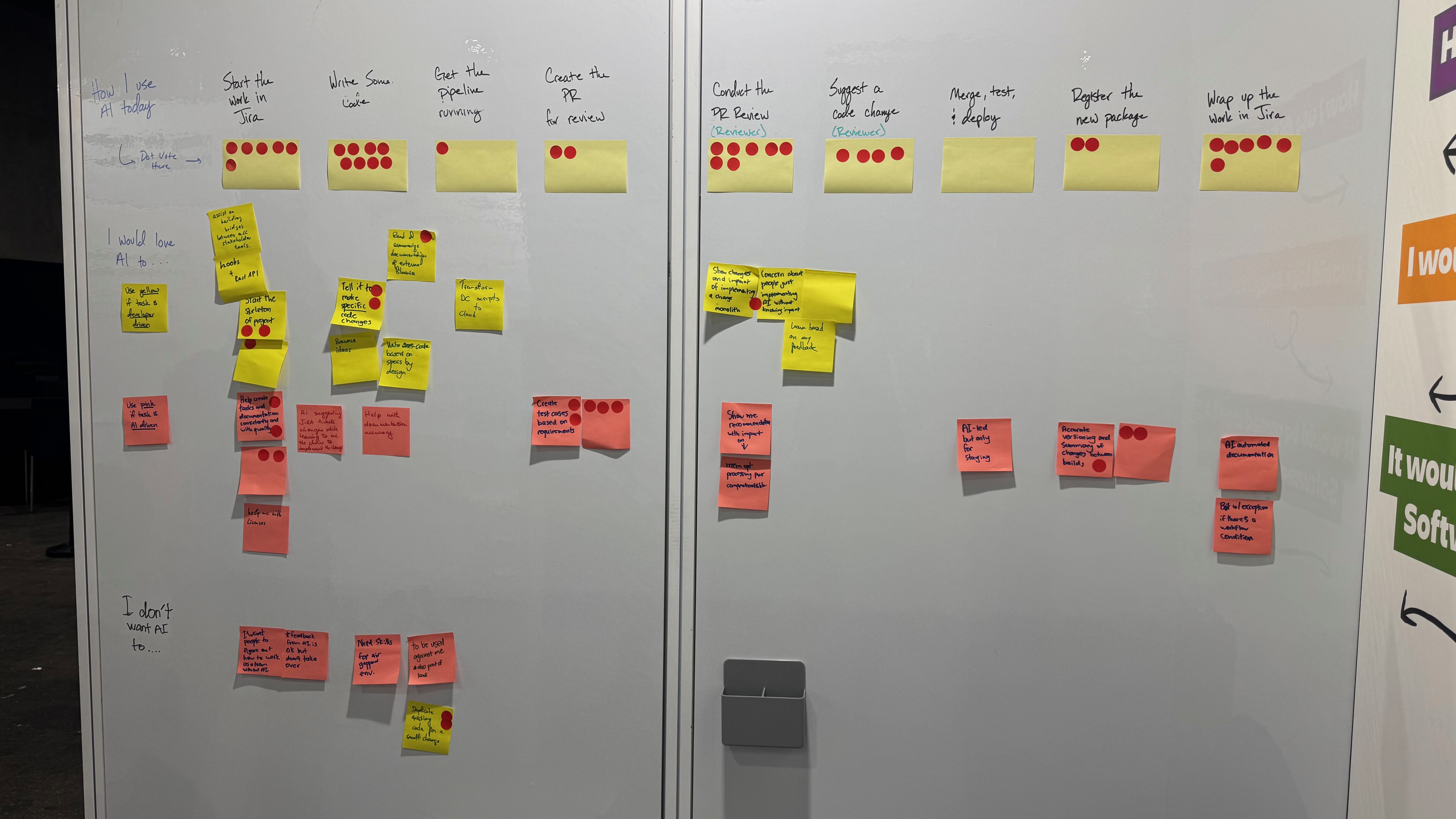
JTBD research board at Atlassian TEAM 2025, Barcelona — sticky notes mapped across the SDLC with red dot voting
The JTBD research board from TEAM 2025, Barcelona. Columns map the full SDLC — from "Start work in Jira" through to "Wrap up work in Jira". Rows capture how developers use AI today, what they'd love AI to do, and what they don't want AI to do. Red dot voting shows which jobs resonated most strongly across participants.
Existing AI jobs
Jobs already being solved by competitors like GitHub Copilot, CodeRabbit, or ChatGPT — the baseline Bitbucket needs to match to be considered a viable alternative.
Opportunity AI jobs
Jobs participants articulated as unmet needs — where no AI tool currently helps them. These represent Bitbucket's opportunity to differentiate, especially by leveraging the Atlassian suite.

Selected jobs from the framework

Authoring — Writing and reviewing code
Jobs developers need during active development and code review
J–
I want a summary of what was modified and why for the whole PR or just this file, so I can focus my review on the most critical aspects. Competitor gap
J–
I want AI to identify changes and suggest improvements or alternatives to code, so I can improve quality without manual review. Competitor gap
J–
I want to review code by highlighting issues and asking for improvements or security checks directly in context. Competitor gap
J–
I want to cross-reference implemented tests with the test cases listed in Jira, so I can identify gaps and ensure comprehensive coverage. Atlassian opportunity
CI/CD — Building and deploying
Jobs in the pipeline and deployment stages of the SDLC
J–
I want AI to diagnose a pipeline failure and suggest a fix, so I can resolve build issues without context-switching to documentation. Competitor gap
J–
I want to automate trial and error in building out a pipeline, so I spend less time debugging configuration files. Atlassian opportunity
J–
I want AI to suggest fixes that prioritise my organisation's biggest concerns — such as PII exposure in regulated environments — not just generic best practices. Atlassian opportunity
🔗
Cross-product — Connecting code to work
Jobs that span Bitbucket, Jira, and Confluence — Bitbucket's unique strategic advantage
J–
I want AI to automatically update my Jira ticket and Confluence documentation as I progress through the SDLC, so I don't need to do it manually. Atlassian opportunity
J–
I want to access repository history for security insights — such as tracking when dependencies were added or updated — directly in context. Atlassian opportunity
J–
I want AI to identify the most suitable reviewers for a PR based on recent contributions to the relevant code areas. Atlassian opportunity

Three strategic takeaways from the JTBD framework

  • Integration is the edgeNo competitor can connect Jira test cases, Confluence documentation, and Bitbucket code in a single AI experience. This is Bitbucket's most defensible differentiator — and participants wanted it.
  • Go proactiveSeveral of the highest-value JTBDs — like summarising a PR when it's opened — require no prompting. Bitbucket should deliver these automatically, not wait for users to know what to ask.
  • Blur the prompt boundaryParticipants didn't distinguish between AI queries for knowledge vs. queries for code action. Bitbucket's AI needs to handle both seamlessly — context-aware across metadata and codebase alike.
Case Study 3 of 3

What would make teams switch to Pipelines?

The Pipelines competitive research started from a deliberately honest question: Bitbucket vs. the Status Quo — how do we make Pipelines worth the migration? Not "how do we market Pipelines better" — but what would actually need to be true about the product, the pricing, and the architecture for a team to move away from what they already have.

I ran semi-structured interviews aided by a Kano-style questionnaire with DevOps engineers and engineering leaders across five different starting points: teams using GitHub Actions, teams using GitLab CI/CD, teams using Jenkins, teams using Azure Pipelines, and teams currently not implementing CI/CD at all. All participants used Jira and Confluence — so they were already Atlassian customers. The question was whether Pipelines could enter the conversation.

The participants

Deliberately diverse in terms of industry and regulatory context — because switching costs and risk tolerance look very different in cybersecurity versus healthcare versus financial services.

GitHub Actions users
Running GitHub as SCM with Actions for CI/CD — the combination most participants saw as the "standard bearer." Microsoft's enterprise licensing meant many had access at no marginal cost.
GitLab CI/CD users
Teams using GitLab's integrated SCM + CI/CD, with some in active migration away from it toward GitHub. Viewed as more capable than Jenkins but losing ground to GitHub Actions.
Jenkins users
Legacy CI/CD setups — high maintenance, high expertise cost, not integrated with SCM. Teams consistently described Jenkins as something they wanted to move away from, not toward.
Azure Pipelines users
Teams in Microsoft ecosystems using Azure Repos and Azure DevOps — again benefiting from enterprise bundling that reduced any financial incentive to look elsewhere.
No CI/CD currently
Teams where not all engineers were expected to understand CI/CD — a specialist or infrastructure team owned it. An opportunity to introduce Pipelines without a migration burden.
Bitbucket + Pipelines
One existing Pipelines user included as a reference point — useful for understanding what's working for teams already inside the Atlassian ecosystem.

The three architectural models tested

Today, Pipelines is only available as part of Bitbucket — we called this Model 0. I tested two alternatives using Kano-style questions to understand how participants valued each option.

0
Bundled with Bitbucket
The current model — Pipelines only available as part of Bitbucket Cloud. Teams must migrate both SCM and CI/CD to use it.
❌ Forces dual migration — amplifies every switching barrier simultaneously
1
Standalone Pipelines
Pipelines as a standalone CI/CD app that works with any SCM — GitHub, GitLab, Azure Repos, or Bitbucket.
✓ Teams only migrate their CI/CD — significantly lower switching cost and risk
2
Bitbucket as a platform
Bitbucket becomes a platform connecting any combination of SCM and CI/CD solutions — not requiring adoption of either.
✓ Potentially zero upfront migration — organisations adopt incrementally

The barriers to switching — and what counteracts them

The research identified five distinct barriers, split between upfront costs (one-time) and ongoing pressures. Understanding the type of barrier matters — because upfront barriers can be addressed by architecture and ease of migration, while ongoing barriers require features and pricing to continuously justify the switch.

Upfront barriers — one-time switching costs
Barriers that exist at the moment of decision
Migration cost
Time and effort needed to migrate before the new tool can even be used. Counteracted by architectures that reduce migration effort (Models 1 and 2) and features like compatibility with current workflows.
GitHub perception
GitHub + GitHub Actions is widely seen as "best of breed" — meaning there's less instinct to look for alternatives at all. Counteracted by Atlassian suite integration and cross-product AI capabilities that GitHub cannot match.
🔄
Ongoing barriers — continuous pressure not to switch
Barriers that persist even after the initial decision moment
ENT licensing
Microsoft's enterprise bundling means teams already have access to GitHub Actions at no marginal cost — even if they're not actively using it. Pipelines must be priced to overcome a perceived zero-cost alternative.
Tooling consolidation
Leadership continually seeks to simplify and reduce the number of DevOps tools. Counteracted by Atlassian's integration story — Pipelines as part of a connected Atlassian ecosystem, not an additional tool.
Integrated experience
Participants consistently said an integrated SCM + CI/CD solution gives a better experience than stitching tools together — and GitHub Actions benefits from this. Counteracted by a Pipelines configuration interface that reduces the seams.

Key observations

"The only thing that would get us off that would be security issues. So for Pipelines to even be considered, it would have to be compatible with our SCM solution — which is not Bitbucket."

— P5, Sr. DevOps Engineer at a financial services company

"If you have a tool which is compatible with what you're doing, you're cutting off that learning curve for the person who is going to be operating it. You don't have to make full adjustments or rewrite everything."

— P5

Strategic recommendations

  • Lead with Models 1 or 2Making Pipelines work with any SCM removes the biggest single barrier to consideration — teams don't need to touch their existing code repository to try it.
  • Price to beat zeroMicrosoft's enterprise bundling means the effective cost of GitHub Actions is zero for many teams. Pipelines' pricing needs to make the switch feel like a gain, not just a cost.
  • AI as the differentiatorFeature and pricing parity alone won't win. Cross-product AI connecting Jira tickets, Confluence docs, Bitbucket code, and Pipelines runs is territory competitors cannot credibly claim.
  • Target Jenkins refugeesTeams using Jenkins are actively looking for something better and have lower lock-in to any particular ecosystem. They represent the most receptive switching audience — especially if Pipelines can offer compatibility with their existing SCM.
  • Awareness is constantAmong Atlassian's own Jira customers, Pipelines was not part of the conversation when thinking about CI/CD options. Improving the product alone won't move the needle if teams don't know Pipelines is now worth considering.

What I learned

🧭

Being first means building the map, not following it

There was no prior research to build on. Every insight I gathered became the foundation — for the JTBD framework, for the AI strategy, for how future researchers on the team would orient themselves to Bitbucket's users.

🔗

The Atlassian advantage is real — but underexploited

Every participant valued Bitbucket's integration with Jira and Confluence. But no product in the Atlassian suite was using AI to connect those integrations. That gap — obvious in retrospect — only became visible through research.

Proactive AI is a different product problem

The most desired AI experiences didn't involve prompts at all — they required AI that observed context and acted without being asked. That's not a UX tweak; it's a fundamental architectural shift. Research surfaced that challenge early enough to shape the roadmap.

📐

Competitive strategy needs its own research

Usability research tells you how well your product works. Competitive research tells you why someone would choose you at all. Running both in parallel — not sequentially — gave the team a complete picture: is the product ready, and is the positioning right?